
Author : Vivek Vardhan Varanasi
CI – Needed tools/applications
- Jenkins
- Apache Maven
- SVN Client / GIT
- Talend Studio / Command Line
- P2 update site – Needs to be downloaded and copied inside Talend studio
Jenkins Steps to be followed
- Setup settings.xml
- Configure nexus ( snapshot and releases )
- Configure any login’s
- Setup m2 pointing to talend studio configuration m2
- Check out source code
- Build with maven parameters
- Setup all related maven options as a configuration
- Build
- Clean, test, package, deploy & publish.
Commands to use to package a route or a job :
mvn -f poms\pom.xml org.talend.ci:builder-maven-plugin:7.2.1:generate -fn -e -pl jobs/routes/listener_route_0.1 -amdmvn -f poms\pom.xml clean install -fn -e -pl jobs/routes/test_1_0.1mvn -f poms\pom.xml clean package -fn -e -pl jobs/routes/test_1_0.1 -amd
How to install CI-Builder JAR on any machine using maven install command :
mvn install:install-file -Dfile=ci.builder-7.2.1.jar -DpomFile=ci.builder-7.2.1.pomLets talk about Maven Phases
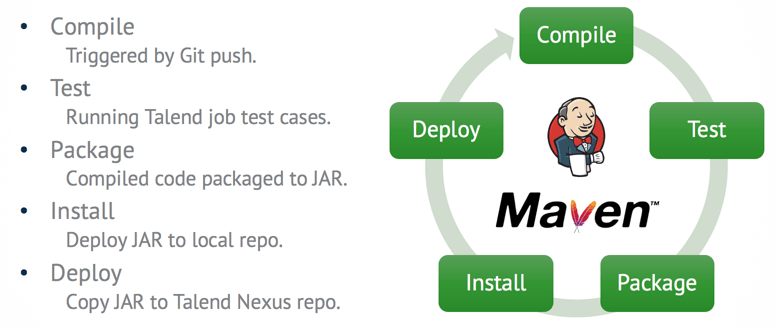
Talend Studio
Talend Studio/CommandLine is built on the Eclipse platform. The zero install workflow is based on the Eclipse P2 provisioning system. P2 provides a way to automate the installation of applications on the Eclipse platform. For more information, see the Eclipse Foundation Equinox p2 documentation page.
The automated download and installation of the CommandLine is done using the Talend builder Maven plugin called CI Builder.
The CI Builder plugin (builder-maven-plugin) implements the zero install workflow, so the plugin must be available to Maven during the build process. Talend Studio/Commandline 7.2.1 unpacks its own version of the CI Builder plugin, as well as the other Talend Maven plugins (cloudpublisher-maven-plugin and signer-maven-plugin), and copies them into the Studio/CommandLine local Maven .m2 repository during the first execution of Studio/CommandLine (.m2 package: org.talend.ci). These plugins are uploaded automatically to the Nexus/Artifactory talend-custom-libs-release repository during Studio sync. In the CI environment, Maven can now access the plugin directly from this repository. The talend-custom-libs-release repository must be referenced in the pluginRepositories section of the Maven settings.xml file.
Flow Diagram

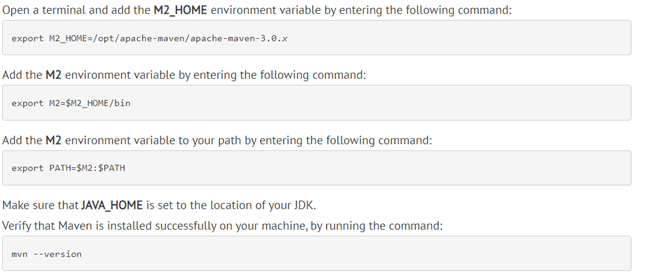
1.Since maven is installed locally, go to maven home -> conf -> settings.xml
2.Add plugin repositories & other configuration for Nexus.
3.Point m2 home path to installed Talend studio m2 path.
Jenkins :


 Talend Best Practices
where to get this ci.builder-7.2.1.jar file?
LikeLike
D:\Talend\7.3.1\studio\configuration\.m2\repository\org\talend\ci\builder-maven-plugin\7.3.1
LikeLike
How to create a pom.xml file?
LikeLike